crap, I am making mistakes all over the place today. Time to call it a day and grab an adult beverage.
I can see the strikethrough on our “See how your feedback displays to buyers on Amazon.” page.
and since I switched to (0) I seem to be at an advantage with the BB because my estimated delivery date shows 1-2 days less than the competition.
Depending on the delivery promise you’re trying to achieve, you might still be able to get this advantage without using same day shipping.
I believe that what matters is the total delivery time (handling/process + transit), and it doesn’t matter how it’s broken down.
So you could do same day shipping + 4 day transit, and get the same result as 2-day shipping + 2 day transit.
If that still gives you the options you want in Buy Shipping, and you can still manage to deliver on time, of course.
So when creating a new SSA template, it allows me to set transit days.
It is also allowing me to separate closer regions for expediting, which it never did before and makes perfect sense. It is a lot cheaper to send overnight or 2 days in State than in other regions.
And there it is!!
The shipping Queen strikes again!!.. 
That sounds about right!! 

The shipping Queen strikes again!!..
I can’t take credit for this one, keyslife needs to wear that crown. I was sure that having an automated template had nothing to do with the settings for my manual templates, but keyslife showed me otherwise.
Actually, jwsmarket had told me the same thing, but not in a way I could understand. Helping me figure it out was all keys.
So when creating a new SSA template, it allows me to set transit days.
If you’re allowed to set your transit days, then you have not enabled the shipping automation. You should have a slider switch at the top like this:
This is from my sample automated template, so the switch is shown in the on position.
Once you turn it on, you have to step through several screens that look like this -
Did you go through that?
You say ‘when creating a new SSA template…’, what does that mean, exactly? Does Amazon give you ‘SSA template’ as a type of template you can create? I can’t check, since I’m already using my max 20 templates so can’t create a new one. 
Yes, it gave me the option to select Carrier Preferences, and it allowed me to set my own Transit Times for Domestic/economy but not Standard shipping, shown as ‘Managed by Amazon.’
This is what it looks like; I have the switch set to the right, which means SSA..correct?
This is what it says when the switch is off:
“Carrier-specific shipping settings that helps you auto-create accurate delivery promises to your customers based on your preferred shipping services and warehouse locations(s). You will no longer need to manually calculate and maintain delivery time per region.”
When the switch is off, it does not give the option to select Carriers.
The transit times in grey are the default settings.
Is the default setting what Amazon is using for SSA?
How can Standard shipping be 2-4 days for all regions, including Hawaii and PR?
CA default is 2-3 days; if my handling time is zero or even 1 day, there is no way buy-shipping will offer First-Class as an option.
Why can Domestic/Free Economy Transit Time be edited in SSA, is it even used?
The shipping automation only gives you the ability to automate these options:
Even when one or both are “automated”, the other template options (Free Economy, Expedited) are not. So you can still control the transit times on those.
Most sellers who try the automation don’t realize this and they let Amazon automate everything, because that’s what those screens you step through, seem to guide you to do. Amazon doesn’t tell you that you can automate only part of your template.
I didn’t realize until I tried it just now, that you can skip the “Standard” automation and only use automation for your premium settings. Maybe this is new, I don’t know. I certainly never noticed it before today.
I have the switch set to the right, which means SSA…correct?
Yes, it means at least part of your template is automated.
The transit times in grey are the default settings.
Is the default setting what Amazon is using for SSA?
No. We have no idea what values Amazon is using for the SSA. Once you turn the automation on, it just does it’s thing without telling you what settings it’s using. You can try and figure it out by looking at the delivery promises it sets, but they don’t tell you ‘we used 2-4 day transit time for a buyer located in xxx’.
How can Standard shipping be 2-4 days for all regions, including Hawaii and PR?
I’m not sure what you’re asking? I don’t think Amazon is suggesting that you use 2-4 days as your transit time setting, they just have to pick one of the options to appear in the box, and 2-4 days is the middle value.
CA default is 2-3 days; if my handling time is zero or even 1 day, there is no way buy-shipping will offer First-Class as an option.
True. Amazon (if I let them) automatically puts 2-3 days as my in-state transit time too. I think they do that for everyone, since they decided a few years ago that we should all offer faster shipping to in-state buyers. I change mine back to 2-4 days to match the rest of the country. With my 2-day handling time, that always gives me FC available in Buy Shipping.
Why can Domestic/Free Economy Transit Time be edited in SSA, is it even used?
Because that’s not one of the services Amazon offers to automate for you. So if you want to offer it, you have to set it up yourself. The same is true for Expedited shipping, and International. There’s no option to automate them, even if you wanted to.
There were a lot of questions about ‘where did expedited go’ in the old forums from people when they first tried the automation. Amazon opted them in to 2-day and 1-day shipping (even if they didn’t realize it) and it appeared to wipe out the ability to choose expedited. Many didn’t realize you could still do it, and you don’t have to automate any part of your templates you don’t want to.
To not automate part of it, just don’t check any boxes on that service’s Preferences screen.
Thank you for your thorough explanation.
You are so knowledgeable, especially in the area of shipping. I always appreciate your insight and I know it’s been said many times but it’s worth repeating, such a loss for NSFE sellers.
I always think of @Roxy as the Dogtamer of shipping.
Um…thanks? 
I’d like to think my explanations are understandable, without the need for a dictionary, thesaurus, and doctorate degree. 
Compliment!  All the way!
Your exlanations are definitely understandable, that’s why everyone always tags you for that info. But for me, I have to really hunker down and focus about halfway through. Thankfully most of it doesn’t apply to me, shipping from Canada. I mainly read (some of) it as mental gymnastics. Mainly because my brain is old and tired, but also because it is a LOT. Amazon does not make things easy. I totally appreciate your willingness to spell it all out.
I enjoyed Dogtamers making me dig out that dictionary (mental gymnastics again) but the doctorate degree ones were a step too far. 
Where are you Dogtammer!!
We all miss him.. 
Hopefully, one of these days, we will track him down so he can make his way home to us.

I just checked my shipping settings and there was a notice at the top of the page that Amazon was going to change my shipping settings on May 30th. I was sure to opt out.
I opted out and they changed it today. I had to go back and downgrade. Check your settings.
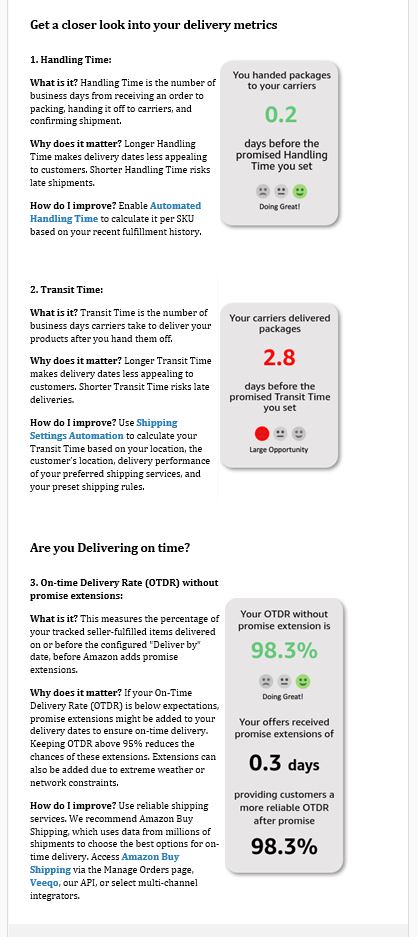
Following up - I got an email titled “Your monthly FBM fulfillment performance overview” today. They are again recommending I try SSA. I wanted to check in with anyone who’s used this.
It appears the delivery promise extensions of 0.3 days had no impact on OTDR.
I have been using Shipping Settings Automation (SSA).
No, it does not. But it does have an icon that states,
“You will find the shipping service that was used to generate the delivery promise for this order. You are not required to ship with this specific shipping service, but it is expected that you will use one of the shipping services you enabled on your Shipping Settings Automation shipping template that can meet the delivery promise for this order.”
No, your account health is protected from negative feedback due to late deliveries.
Do they protect your account against ODR hits for late deliveries when following SSA?
Thanks,
Mike
Yes, as long as the shipping label is purchased through Amazon Buy Shipping Services, but I believe you may be referring to the On-Time Delivery Rate (OTDR).
The Order Defect Rate (ODR) does not take hits, dings, or penalties for late deliveries.
An ODR hit results in 1 of the 3: negative feedback, an A-to-z Guarantee claim that is not denied, or a credit card chargeback.
The On-Time Delivery Rate (OTDR) is protected by purchasing shipping labels through Amazon’s Buy Shipping services.
Using SSA with Buy Shipping and shipping on-time will protect your account health from OTDR hits.
Did SSA always protect sellers? When it came out, my understanding was that it did not.
In theory, this is the same for using Amazon shipping even without utilizing their automation.