# My FBA item was just sold FBM
**URL:** https://sellersasksellers.com/t/my-fba-item-was-just-sold-fbm/4253
**Category:** Selling on Amazon
**Tags:** glitch, manage-orders, customer-service
**Created:** [June 23, 2024, 8:24pm UTC](https://sellersasksellers.com/t/my-fba-item-was-just-sold-fbm/4253 "2024-06-23T20:24:14Z")
**Posts on this page:** 18
**Page:** 1
### Author:  [@Canadianmag](https://sellersasksellers.com/u/Canadianmag)
#### Post date: [June 23, 2024, 8:24pm UTC](https://sellersasksellers.com/t/my-fba-item-was-just-sold-fbm/4253/1 "2024-06-23T20:24:14Z")
I have an item at Amazon listed FBA. I just received a notice I sold one FBM. How is this possible? I even went and looked and it’s clearly FBA, it’s got inventory there and it has the prime badge. Even says ships by Amazon on the listing.
What’s even stranger, on my FBM right now I have a 7 day production time on my individual items as I’m out of town. It even picked up on the extended turn time.
This item has been FBA for awhile now and the purchase date was today
---
### Author:  [@Canadianmag](https://sellersasksellers.com/u/Canadianmag)
#### Post date: [June 23, 2024, 8:51pm UTC](https://sellersasksellers.com/t/my-fba-item-was-just-sold-fbm/4253/3 "2024-06-23T20:51:20Z")
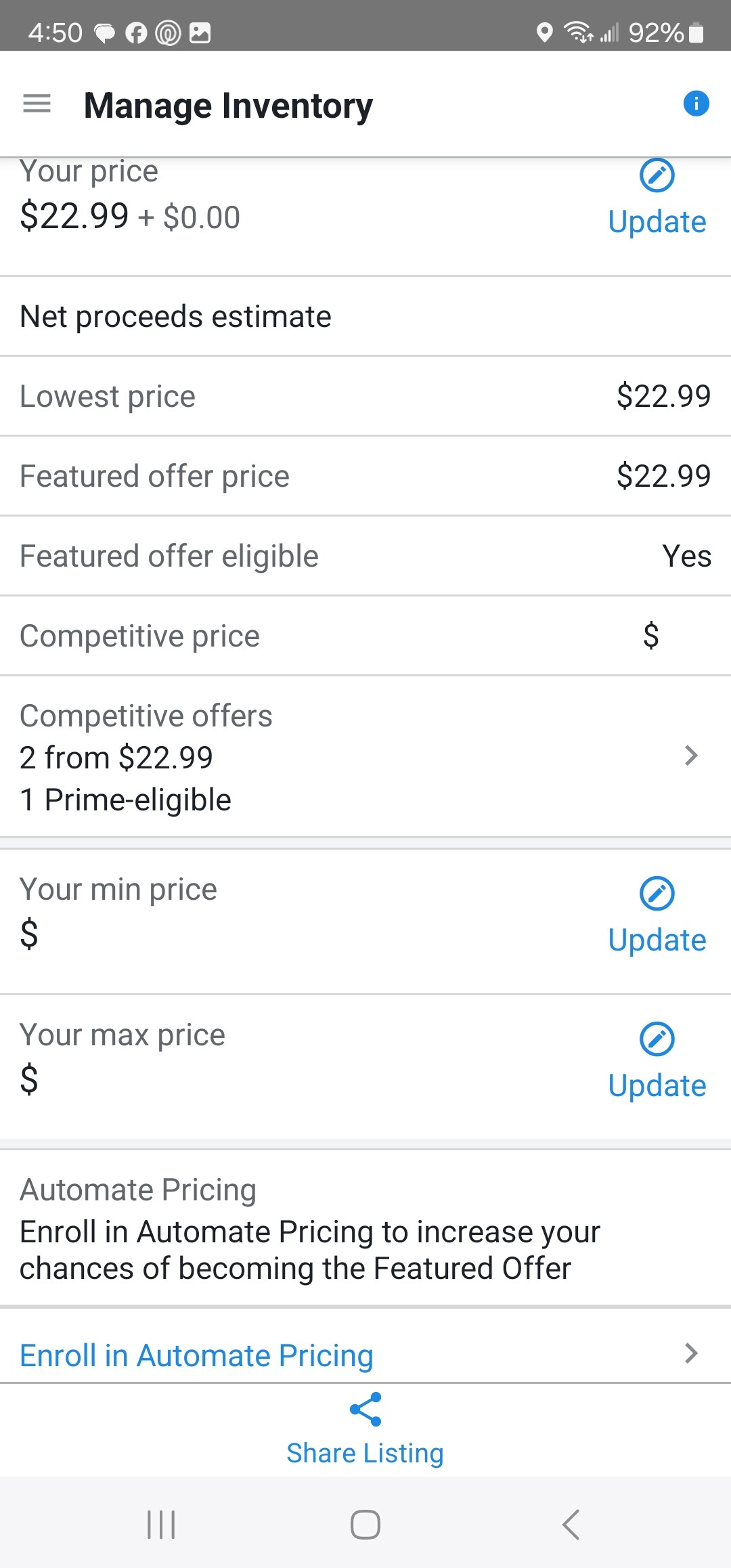
Ok I found this in the app, cannot edit anything. I don’t even see this on my desktop.
---
### Author:  [@dwat0870](https://sellersasksellers.com/u/dwat0870)
#### Post date: [June 23, 2024, 9:14pm UTC](https://sellersasksellers.com/t/my-fba-item-was-just-sold-fbm/4253/4 "2024-06-23T21:14:23Z")
> [@Canadianmag](#):
>
> This item has been FBA for awhile now
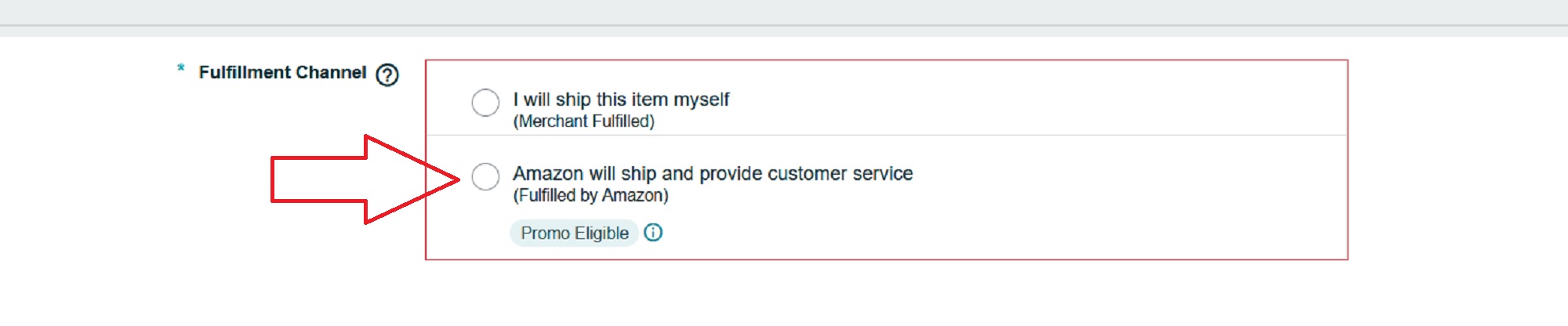
Was this item EVER an FBM item?
If so, did you go in and unclick the FBM box when you converted to FBA?
---
### Author:  [@ASV\_Vites](https://sellersasksellers.com/u/ASV_Vites)
#### Post date: [June 23, 2024, 9:45pm UTC](https://sellersasksellers.com/t/my-fba-item-was-just-sold-fbm/4253/5 "2024-06-23T21:45:57Z")
Is it possible to MCF this since the OP is out of town? I don’t want to get anyone in trouble as I know zero about FBM or the rules surrounding using FBA to fulfill a FBM order.
Just thinking about ways to get them out of a jam if possible without having to cancel.
---
### Author:  [@Canadianmag](https://sellersasksellers.com/u/Canadianmag)
#### Post date: [June 23, 2024, 9:52pm UTC](https://sellersasksellers.com/t/my-fba-item-was-just-sold-fbm/4253/6 "2024-06-23T21:52:06Z")
I sell like 5 a day, this one can over weird it’s odd
---
### Author:  [@dwat0870](https://sellersasksellers.com/u/dwat0870)
#### Post date: [June 24, 2024, 1:49am UTC](https://sellersasksellers.com/t/my-fba-item-was-just-sold-fbm/4253/7 "2024-06-24T01:49:19Z")
Back to my question. If you ever sold it FBM and did NOT uncheck the box your item will show two offers – one as an Amazon offer (from you) and the other merchant fulfilled.
There are tens of thousands of ASINs out there where sellers do both in order to capture business from people who avoid Amazon at all costs but still shop there!
---
### Author:  [@Pepper\_Thine\_Angus](https://sellersasksellers.com/u/Pepper_Thine_Angus)
#### Post date: [June 24, 2024, 1:57am UTC](https://sellersasksellers.com/t/my-fba-item-was-just-sold-fbm/4253/8 "2024-06-24T01:57:08Z")
Yes you can MCF an FBM order
---
### Author:  [@Canadianmag](https://sellersasksellers.com/u/Canadianmag)
#### Post date: [June 24, 2024, 2:00am UTC](https://sellersasksellers.com/t/my-fba-item-was-just-sold-fbm/4253/9 "2024-06-24T02:00:28Z")
Yes I sold FBM months ago. Since I’m not aware of a check box I’m going to assume I never unchecked it. I’ll see how it’s done and figure that out tomorrow.
---
### Author:  [@Canadianmag](https://sellersasksellers.com/u/Canadianmag)
#### Post date: [June 24, 2024, 2:00am UTC](https://sellersasksellers.com/t/my-fba-item-was-just-sold-fbm/4253/10 "2024-06-24T02:00:56Z")
Smart!!! I’ll do that.
---
### Author:  [@Canadianmag](https://sellersasksellers.com/u/Canadianmag)
#### Post date: [June 24, 2024, 2:33am UTC](https://sellersasksellers.com/t/my-fba-item-was-just-sold-fbm/4253/11 "2024-06-24T02:33:22Z")
I see where this is now, and yes I did check this and its checked.
I did fix this one issue with MCF, I would have never thought of this! This forum is soo amazing. I was going to get hit for late shipping, but this only costs me a few more dollars and saves my booty!
Thank you so much!
---
### Author:  [@Pepper\_Thine\_Angus](https://sellersasksellers.com/u/Pepper_Thine_Angus)
#### Post date: [June 24, 2024, 2:35am UTC](https://sellersasksellers.com/t/my-fba-item-was-just-sold-fbm/4253/12 "2024-06-24T02:35:18Z")
You can also put your store on “Vacation mode” and this will stop all FBM orders in their tracks (minus orders stuck in pending) but will not touch FBA orders. They continue to flow no problem.
---
### Author:  [@Canadianmag](https://sellersasksellers.com/u/Canadianmag)
#### Post date: [June 24, 2024, 2:58am UTC](https://sellersasksellers.com/t/my-fba-item-was-just-sold-fbm/4253/13 "2024-06-24T02:58:24Z")
I thought about that, I changed my production time 7-8 days instead. I thought that would be the best strategy this time around for me. We’ll see how it pans out.
---
### Author:  [@primetime](https://sellersasksellers.com/u/primetime)
#### Post date: [June 24, 2024, 4:22am UTC](https://sellersasksellers.com/t/my-fba-item-was-just-sold-fbm/4253/14 "2024-06-24T04:22:31Z")
Your screenshot shows there are 2 competitive offers. Are they both your offers, one FBA and one FBM? If so you can set the quantity to zero on the FBM offer to prevent more orders white you are gone.
Buyers without Prime membership will choose a free shipping FBM offer over an FBA offer because Amazon will charge them for shipping.
---
### Author:  [@papy](https://sellersasksellers.com/u/papy)
#### Post date: [June 24, 2024, 11:39pm UTC](https://sellersasksellers.com/t/my-fba-item-was-just-sold-fbm/4253/15 "2024-06-24T23:39:39Z")
> [@ASV\_Vites](#):
>
> Is it possible to MCF this since the OP is out of town?
> [@Pepper\_Thine\_Angus](#):
>
> Yes you can MCF an FBM order
> [@Canadianmag](#):
>
> I did fix this one issue with MCF, I would have never thought of this! This forum is soo amazing.
Hey, @ASV_Vites and @Pepper_Thine_Angus FTW with the assist! Thank you 🙏🤩
---
### Author:  [@papy](https://sellersasksellers.com/u/papy)
#### Post date: [June 24, 2024, 11:41pm UTC](https://sellersasksellers.com/t/my-fba-item-was-just-sold-fbm/4253/16 "2024-06-24T23:41:41Z")
> [@primetime](#):
>
> you can set the quantity to zero on the FBM offer to prevent more orders white you are gone.
☝ YES, exactly this @Canadianmag. It saves any of the hassles that can arise from Vacation Mode (loss of rank or eligibilities, reverification, etc) AND completely prevents orders.
---
### Author:  [@Dogtamer](https://sellersasksellers.com/u/Dogtamer)
#### Post date: [June 24, 2024, 11:59pm UTC](https://sellersasksellers.com/t/my-fba-item-was-just-sold-fbm/4253/17 "2024-06-24T23:59:33Z")
> [@primetime](#):
>
> …you can set the quantity to zero on the FBM offer to prevent more orders white you are gone.
> …
> [@papy](#):
>
> ☝ YES, exactly this @Canadianmag. It saves any of the hassles that can arise from Vacation Mode (loss of rank or eligibilities, reverification, etc) AND completely prevents orders.
I don’t disagree, generally - after all, that’s **exactly** how the system’s Theory of Operation _ **was** _ designed to work, when Amazon first crafted it - but I feel I would be remiss in failing to point out that in the situation where both FBA & FBM Offer-Listings have been made, by an individual 3P Seller, on any Amazon Global Catalog Listing ASIN, there’s _always_ at least a chance that one or another FBA/AFN-involved Amazon employee - be they human, or be they bot - might misroute an FBA-returned item over to FBM.
Those who are old hands in dealing with Amazon _are_, of course, well-aware of that possibility - but as the SellersAskSeller Forum gains ever-increasing credence, influence, and importance (by the day) amongst the eCommerce Seller Community, I feel compelled to highlight the never-ending need to ‘Pay Forward’ the help previously received in any way we can.
---
### Author:  [@primetime](https://sellersasksellers.com/u/primetime)
#### Post date: [June 25, 2024, 1:37am UTC](https://sellersasksellers.com/t/my-fba-item-was-just-sold-fbm/4253/18 "2024-06-25T01:37:41Z")
> [@Dogtamer](#):
>
> FBA/AFN-involved Amazon employee - be they human, or be they bot - might misroute an FBA-returned item over to FBM
Never heard of this happening (doesn’t mean it hasn’t); so an FBA agent\* can change the FBM inventory quantity? Could it be that is the source of some of the renowned ‘ghost’ listings on long out of stock items? I always thought those were a server glitch.
\*human or otherwise
---
### Author:  [@bookwormapril](https://sellersasksellers.com/u/bookwormapril)
#### Post date: [June 26, 2024, 3:00pm UTC](https://sellersasksellers.com/t/my-fba-item-was-just-sold-fbm/4253/19 "2024-06-26T15:00:41Z")
> [@ASV\_Vites](#):
>
> Is it possible to MCF this since the OP is out of town? I don’t want to get anyone in trouble as I know zero about FBM or the rules surrounding using FBA to fulfill a FBM order.
Amazon does not forbid using MCF for merchant-fulfilled Amazon orders, but they do discourage it. They declare that if you do this Amazon is not responsible for damage or loss.